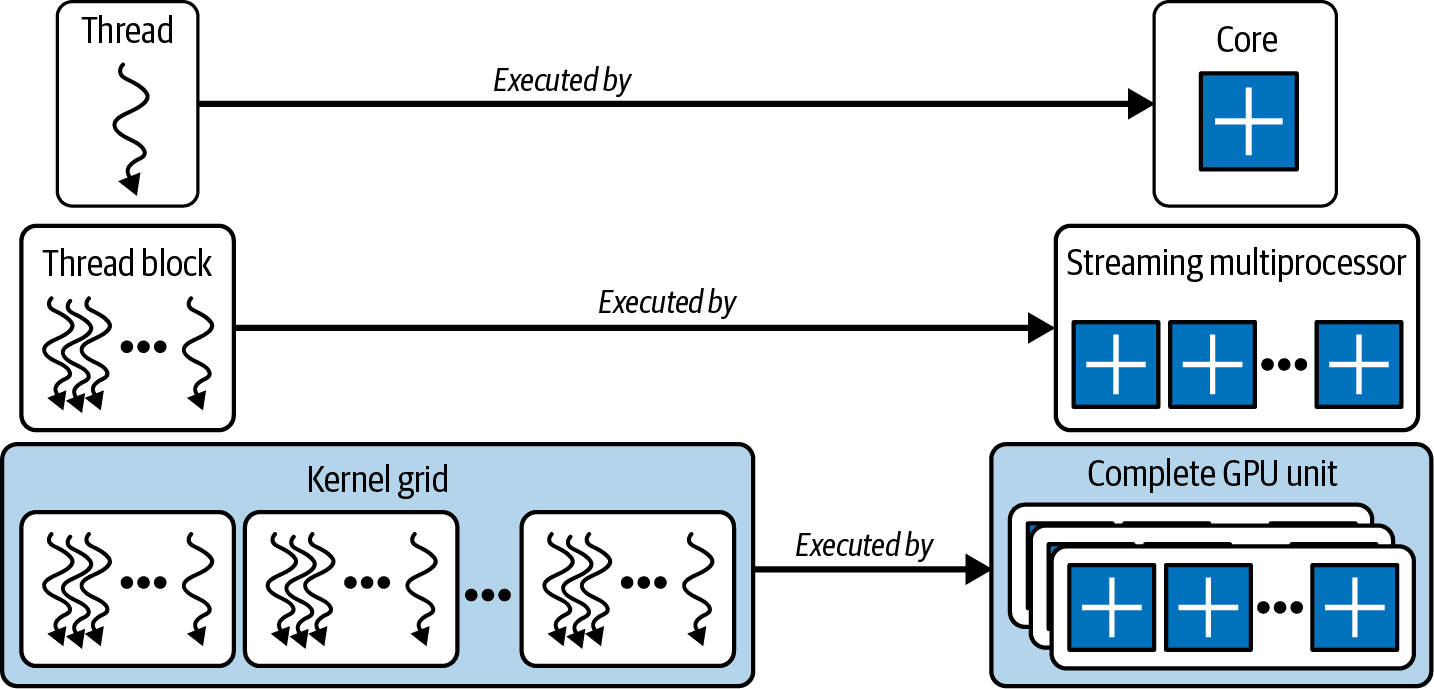
Understanding how a GPU schedules and executes work is one of the most important concepts when troubleshooting performance issues or trying to optimise GPU applications. If you don't understand how work flows through the GPU, it becomes difficult to explain why one kernel performs well while another doesn't.
Let's break down the different work units that make up a CUDA kernel launch.
Kernel
The first thing to understand is the kernel.
A kernel is simply a function that runs on the GPU. It has nothing to do with the Linux kernel.
Whenever your application launches work on the GPU, it launches a kernel. The GPU creates the execution context for that kernel and schedules it across the available Streaming Multiprocessors (SMs).
For example, when you call:
torch.matmul(A, B)
PyTorch eventually launches one or more CUDA kernels behind the scenes to perform the matrix multiplication.
Everything else we'll discuss—threads, warps, thread blocks and grids—exists inside that kernel launch.
Thread
A thread is the smallest unit of execution on the GPU.
Each thread executes one sequence of instructions independently. Every thread has its own:
- program counter
- registers
- local memory
Although every thread runs the same kernel code, each one usually works on different pieces of data.
For example, suppose we multiply two 3 × 3 matrices.
A (3×3) × B (3×3) = C (3×3)
One simple approach is to assign one thread to compute one output element.
thread 0 → computes C[0][0]
thread 1 → computes C[0][1]
thread 2 → computes C[0][2]

thread 3 → computes C[1][0]
thread 4 → computes C[1][1]
thread 5 → computes C[1][2]

thread 6 → computes C[2][0]
thread 7 → computes C[2][1]
thread 8 → computes C[2][2]
That gives us 9 threads, each computing one dot product independently.
Instead of calculating every output element one after another on a CPU, all nine threads can execute at the same time on the GPU, which is one of the reasons GPUs are so effective at massively parallel workloads.
Warp
Although we often think about individual threads, the GPU doesn't schedule them one at a time.
Instead, it groups threads into warps.
A warp is a collection of 32 threads.
Warp 0 = Threads 0 - 31

Warp 1 = Threads 32 - 63

Warp 2 = Threads 64 - 95
The size of a warp (32 threads) is fixed by NVIDIA hardware.
All 32 threads inside a warp execute the same instruction at the same time on different pieces of data. NVIDIA calls this Single Instruction, Multiple Threads (SIMT).
For example, if the current instruction is:
C[i] = A[i] + B[i];
every thread in the warp performs the addition simultaneously, but each thread uses different values of i.
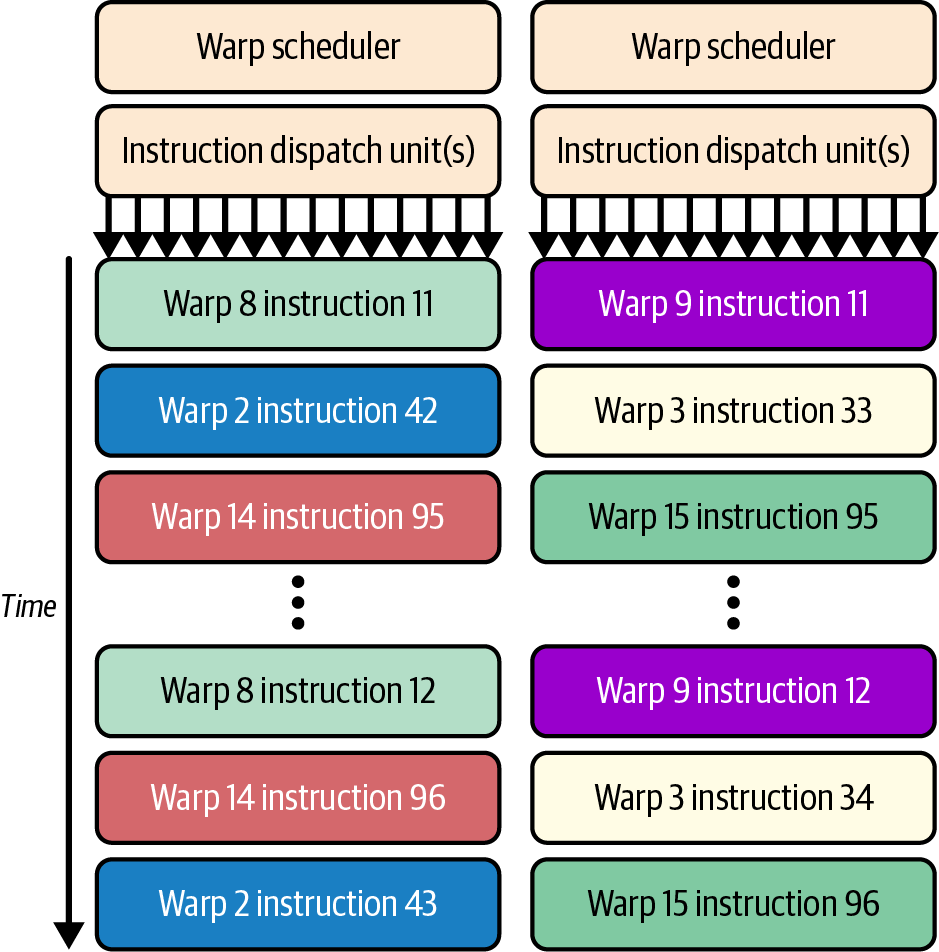 Source: Figure 1. GPU execution hierarchy showing the relationship between threads, warps, thread blocks, SMs and the GPU. Adapted from AI Systems Performance Engineering by Chris Fregly (O'Reilly Media).
Warp divergence
Things become less efficient when threads inside the same warp take different execution paths.
For example:
if (value > 0)
    do_A();
else
    do_B();
Suppose half the threads satisfy the condition while the other half don't.
The GPU cannot execute both branches at the same time.
Instead, it executes one branch while the remaining threads sit idle, then executes the second branch while the first group waits.
This is called warp divergence.
The more threads within a warp follow different execution paths, the more execution time is wasted waiting for other threads to finish.
This is one reason GPU kernels try to minimise branching wherever possible.
Thread Block
A thread block is a collection of threads.
Unlike individual threads, the GPU schedules thread blocks onto Streaming Multiprocessors (SMs).
Each thread block is assigned entirely to one SM and never split across multiple SMs.
An SM can often execute multiple thread blocks at the same time, depending on how many registers, shared memory and other hardware resources those blocks require.
Threads inside the same block can cooperate by using shared memory, which is much faster than global GPU memory.
They can also synchronise with each other using barriers such as:
__syncthreads();
Threads in different thread blocks cannot directly synchronise or share shared memory because they may be running on completely different SMs.
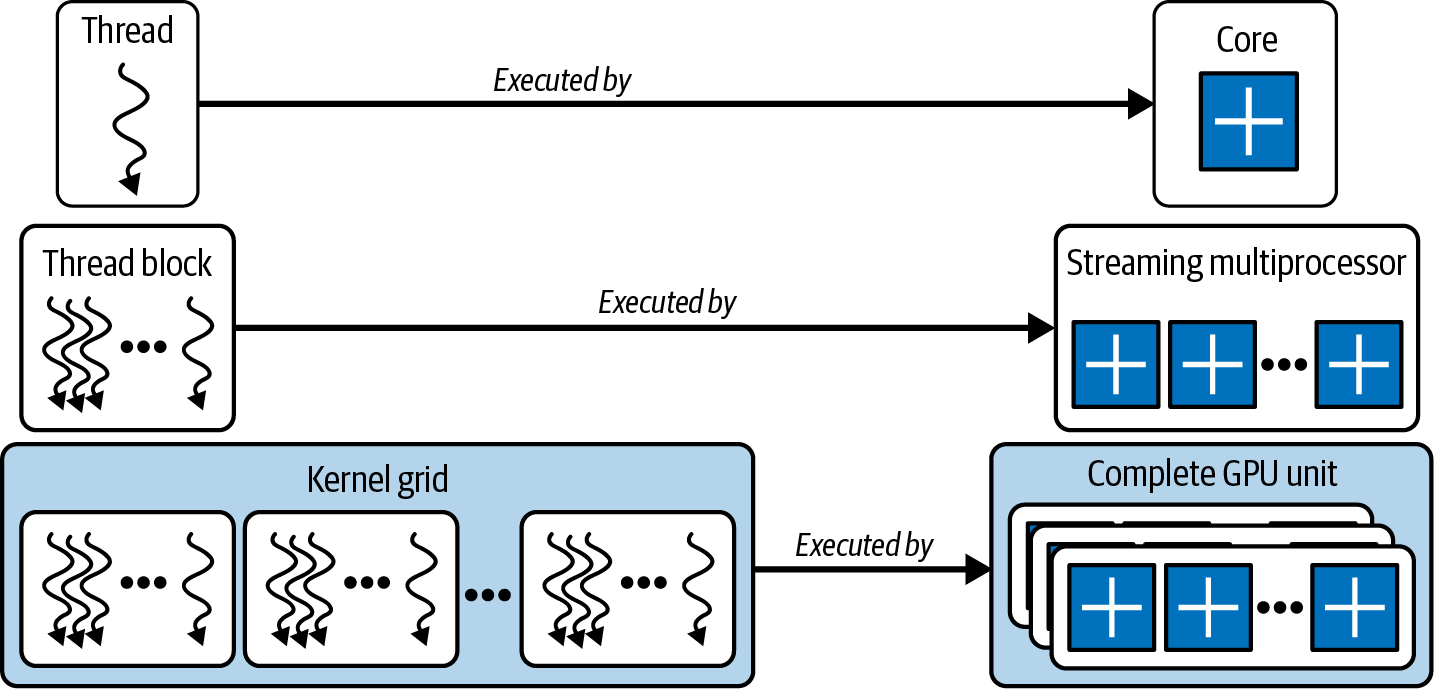 Source: Figure 2. GPU execution hierarchy showing the relationship between threads, warps, thread blocks, SMs and the GPU. Adapted from AI Systems Performance Engineering by Chris Fregly (O'Reilly Media).
Grid
A grid represents the entire kernel launch.
It contains every thread block needed to complete the work.
Conceptually, a CUDA kernel launch looks like this:
kernel<<<grid, block>>>(...);where
grid = number of thread blocks
block = number of threads per block
For example, suppose we want to multiply two 1024 × 1024 matrices.
The output matrix contains:
1024 × 1024 = 1,048,576 elements
If we assign one thread to compute each output element, we need:
1,048,576 threads
Now suppose each thread block contains:
32 × 32 = 1024 threads
The number of thread blocks required becomes:
1,048,576 ÷ 1024 = 1024 thread blocks
The kernel launch would conceptually look like:
grid  = (32, 32)

block = (32, 32)
This creates:
32 × 32 = 1024 thread blocks
1024 threads per block
1,048,576 threads in total
Each thread computes exactly one output element.
The GPU then distributes these thread blocks across all available SMs. As an SM finishes one thread block, it immediately picks up another until the entire grid has completed.
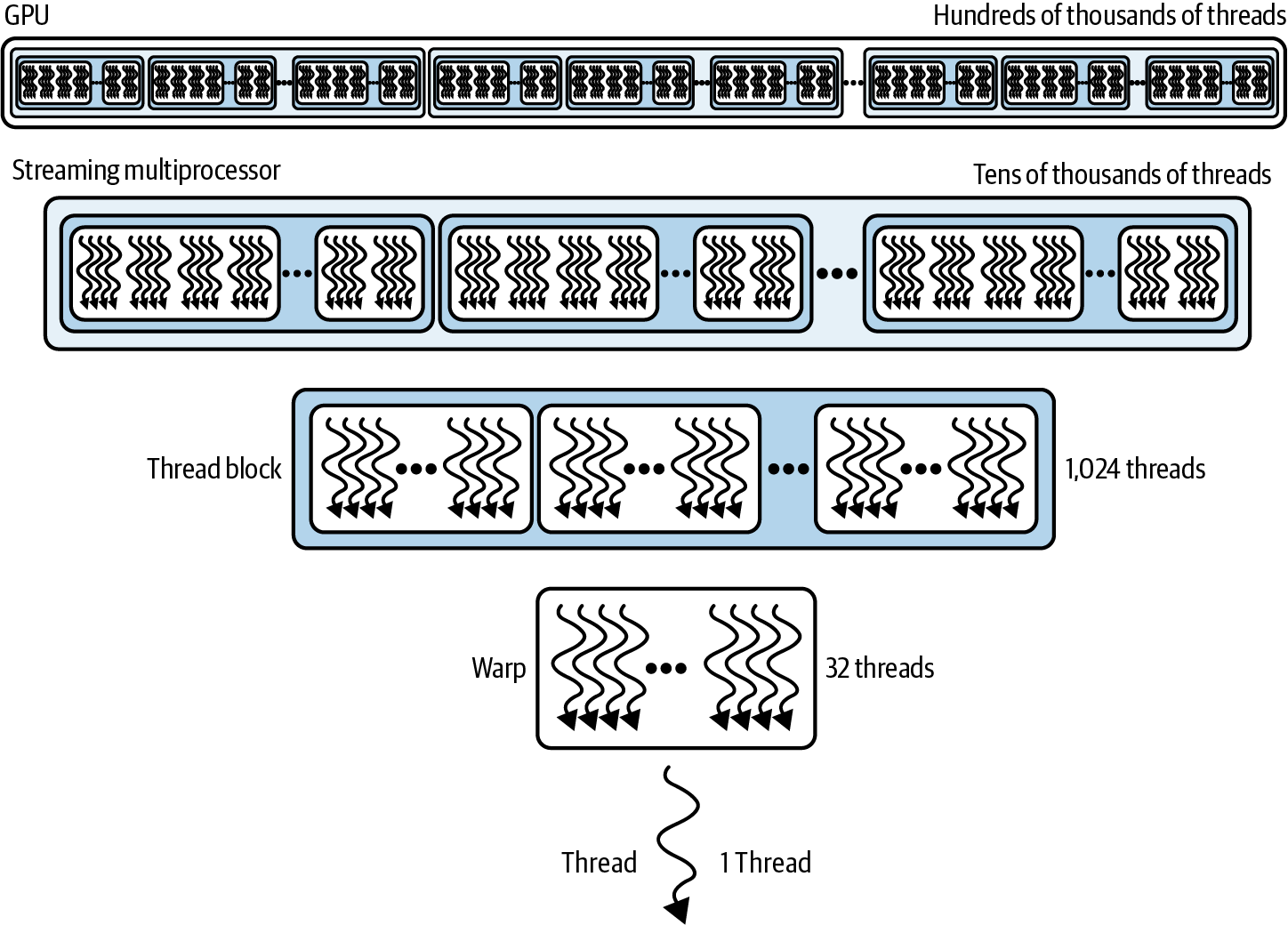 Source: Figure 3. GPU execution hierarchy showing the relationship between threads, warps, thread blocks, SMs and the GPU. Adapted from AI Systems Performance Engineering by Chris Fregly (O'Reilly Media).
Putting it all together
The hierarchy now looks like this:
Kernel → Grid → Thread Blocks → Warps (32 threads each) → Threads
This hierarchy is how every CUDA application is executed.
Once you understand it, concepts such as occupancy, shared memory, warp divergence and kernel scheduling become much easier to reason about because you know exactly where each piece fits in the GPU execution model.