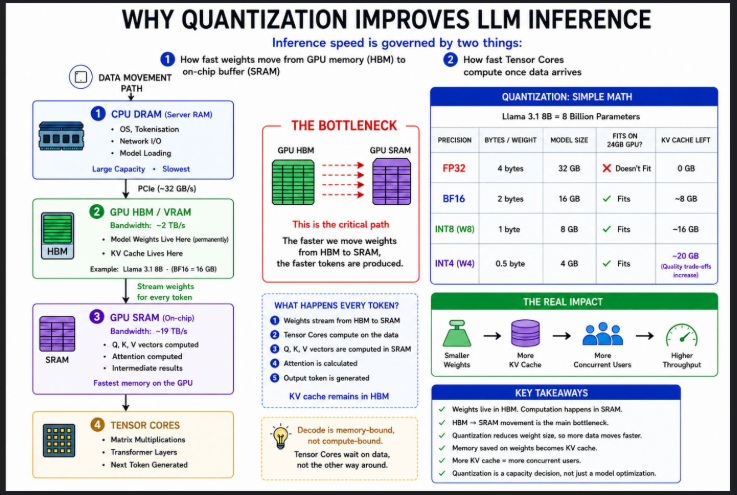
Before you tune vLLM, understand what actually governs inference speed. It comes down to two things:
- How fast weights can move from GPU memory (HBM/VRAM) to the on-chip compute buffer (SRAM)
- How fast the tensor cores can compute once the data arrives
Everything else is downstream of these two constraints.
Three layers of memory, three very different speeds
CPU DRAM is your server's main RAM, used for the OS, tokenisation, and I/O. Slow but large.
GPU HBM/VRAM is the memory on the GPU card itself, closest to the compute cores. An A100 delivers around 2 TB/s here. This is where model weights live permanently during serving.
GPU SRAM is the on-chip memory sitting right next to the tensor cores. An A100 delivers close to 19 TB/s here. This is where actual computation happens.
What happens when an inference pod starts up
At startup, weights load from disk into CPU RAM, then transfer into GPU HBM via PCIe. This happens once and the weights stay there for the lifetime of the server. For every token generated, those weights stream from HBM into SRAM for computation, then get discarded. Only the KV cache stays.
Decode is memory-bound. Tensor cores sit idle waiting on data, not the other way around.
This is where quantisation helps, through two mechanisms:
Weight only (W8, W4) — smaller weights move faster from HBM to SRAM. Reduces memory footprint and movement time.
Weights and activations (W8A8, FP8) — tensor cores run native low-precision arithmetic. An A100 does INT8 matmuls at roughly 2x the throughput of BF16. This makes computation faster too.
The math for Llama 3.1 8B on an RTX 4090 (24 GB VRAM):
fp32  8B x 4 bytes = 32 GB does not fit
bf16  8B x 2 bytes = 16 GB 8 GB left for KV cache
int8  8B x 1 byte = 8 GB 16 GB left for KV cache
int4  8B x 0.5   = 4 GB 20 GB left for KV cache
The memory saved on weights goes directly to KV cache. More KV cache means more concurrent users.
Quantisation is a memory optimisation and throughput decision, not just a model optimisation.
hashtag#LLMInference hashtag#vLLM hashtag#GPU hashtag#MLInfrastructure hashtag#PlatformEngineering hashtag#Quantization