Understanding GPU Architecture
If you've followed this series so far, we've already looked at how the GPU organises work using threads, warps and thread blocks, and we've explored the GPU memory hierarchy.
The next question is:
Where does all of that work actually happen?
The answer lies in the GPU's architecture.
Understanding the architecture makes many AI concepts much easier to understand, from LLM inference and distributed training to quantisation and FlashAttention. Once you know how the hardware is organised, many GPU optimisation techniques stop feeling like magic and start making engineering sense.
Throughout this article, we'll use the NVIDIA H100 SXM5 as our reference GPU. Different GPU generations have slightly different specifications, but the overall architecture is very similar across modern NVIDIA GPUs.
Why Were GPUs Created?
The GPU, or Graphics Processing Unit, was originally designed to render graphics for video games.
Rendering a single frame means calculating the colour of millions of pixels. Since every pixel can be computed independently, graphics processing is naturally a massively parallel problem.
Instead of building a processor with a few very powerful cores, engineers designed the GPU with thousands of smaller cores capable of performing many calculations at the same time.
Over time, researchers realised that this same architecture was also perfect for scientific computing.
Many scientific workloads involve performing the same mathematical operation over millions of data points. Neural networks are no different. Training and running an LLM ultimately comes down to performing enormous numbers of matrix multiplications, exactly the kind of workload GPUs were designed for.
Today, GPUs power far more than gaming. They have become the foundation of modern AI, scientific computing and high-performance computing.
CPU vs GPU
Although CPUs and GPUs are both processors, they are designed for different types of work.
A CPU has a relatively small number of powerful cores. These cores are designed to execute complex instructions quickly, switch efficiently between different tasks and respond to unpredictable workloads.
This makes CPUs ideal for running operating systems, databases, web servers and general-purpose applications.
A GPU takes a different approach.
Instead of a handful of powerful cores, it contains thousands of simpler compute cores organised into many Streaming Multiprocessors (SMs).
Rather than focusing on a few tasks, the GPU is designed to perform the same operation across massive amounts of data simultaneously.
This is why GPUs excel at workloads such as:
- Training deep learning models
- LLM inference
- Scientific simulations
- Image rendering
- Video processing
A simple way to think about it is this:
CPUs are designed to minimise the time it takes to complete one task. GPUs are designed to maximise the amount of work completed across many tasks at the same time.
That's why GPUs are often described as being optimised for throughput, while CPUs are optimised for low latency.
The GPU at a High Level
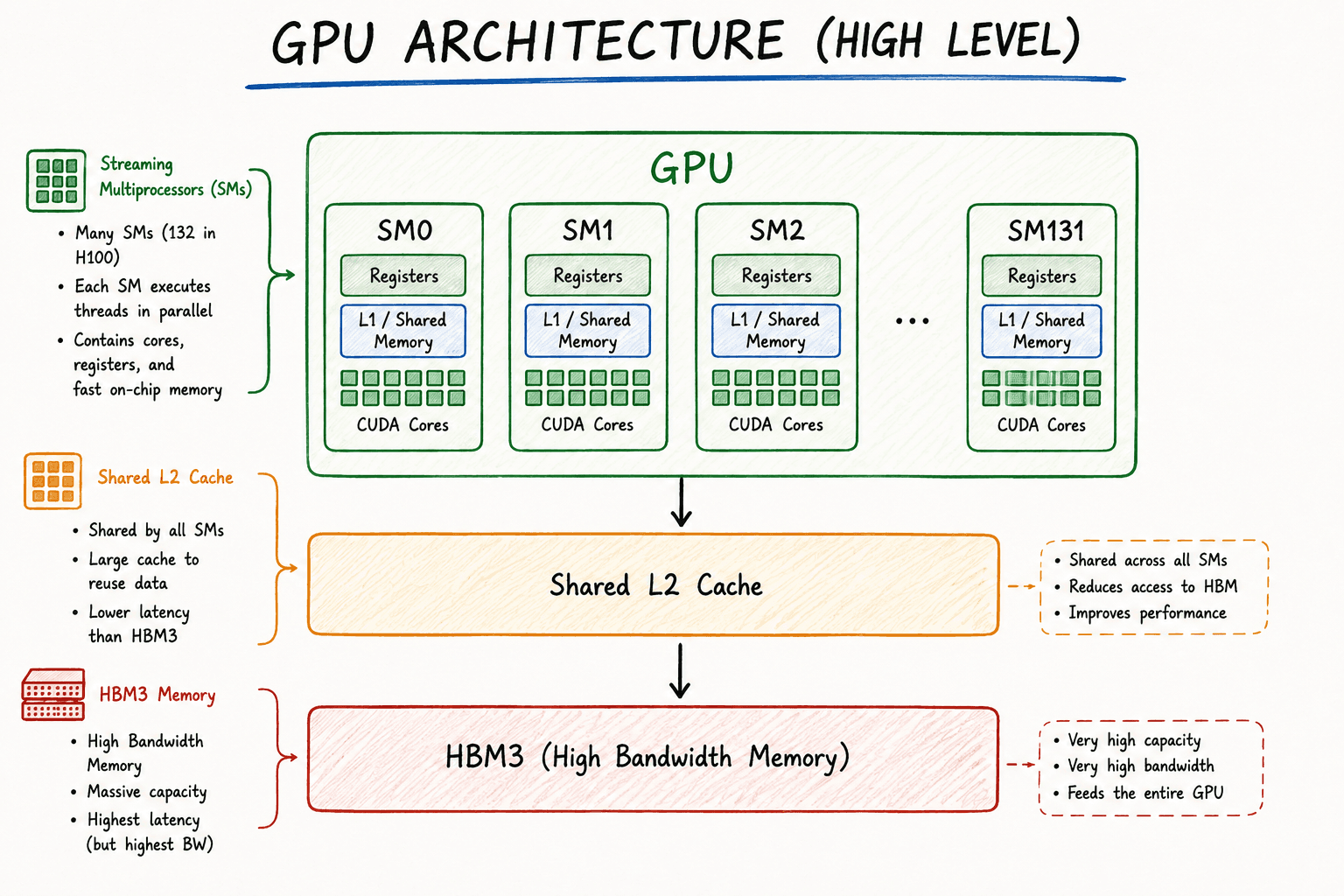
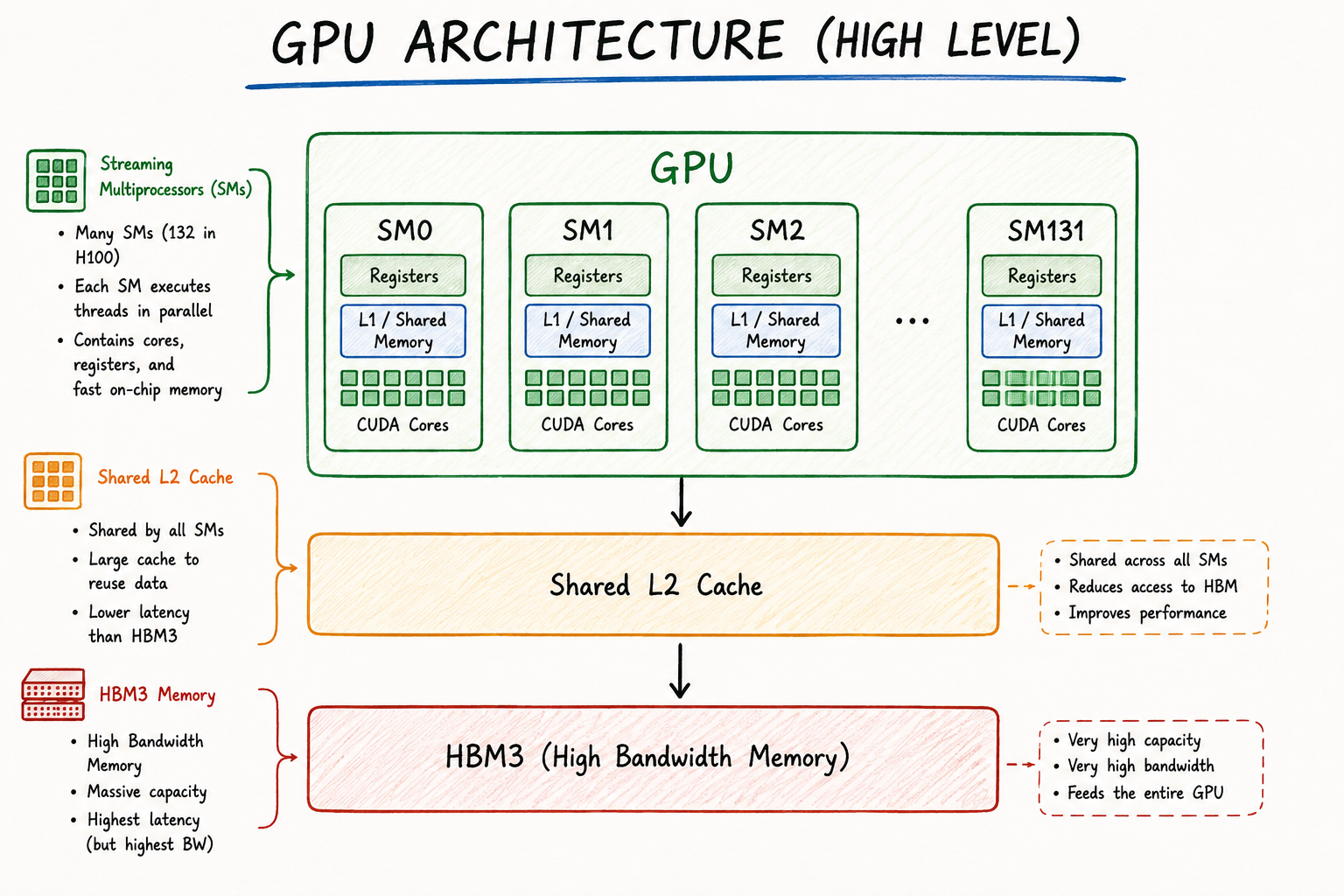
At a high level, a modern GPU is made up of many Streaming Multiprocessors (SMs) connected to a shared memory system.
Think of the GPU as a country.
The GPU itself is the entire country.
Each Streaming Multiprocessor (SM) is like a state within that country.
When you launch a CUDA kernel, the GPU doesn't send individual threads directly to CUDA Cores or Tensor Cores.
Instead, the scheduler distributes thread blocks across the available SMs.
Each SM then executes the threads assigned to it independently.
This is what allows modern GPUs to process millions of threads in parallel.
On an NVIDIA H100 SXM5, there are 132 Streaming Multiprocessors working together to execute GPU workloads.
Figure 1. High-level view of a GPU
In the next section, we'll zoom into a single Streaming Multiprocessor and explore the hardware that actually performs the computation.
Inside a Streaming Multiprocessor (SM)
Earlier we saw that when a CUDA kernel is launched, the GPU distributes thread blocks across the available Streaming Multiprocessors (SMs).
But what exactly is an SM?
You can think of an SM as a small processor inside the GPU.
It's where the actual work happens.
Once a thread block is assigned to an SM, every instruction, memory access and arithmetic operation for that thread block is executed there.
Rather than being one large processor, the GPU is made up of many SMs working together in parallel.
On an NVIDIA H100 SXM5, there are 132 SMs, each capable of executing multiple thread blocks simultaneously, provided there are enough registers, shared memory and other hardware resources available.
What's Inside an SM?
Although GPU generations differ slightly, every modern NVIDIA SM contains the same core building blocks.
- CUDA Cores
- Tensor Cores
- Warp Schedulers
- Registers
- Shared Memory / L1 Cache
- Load/Store Units
- Special Function Units (SFUs)
Figure 2. Simplified view of a Streaming Multiprocessor
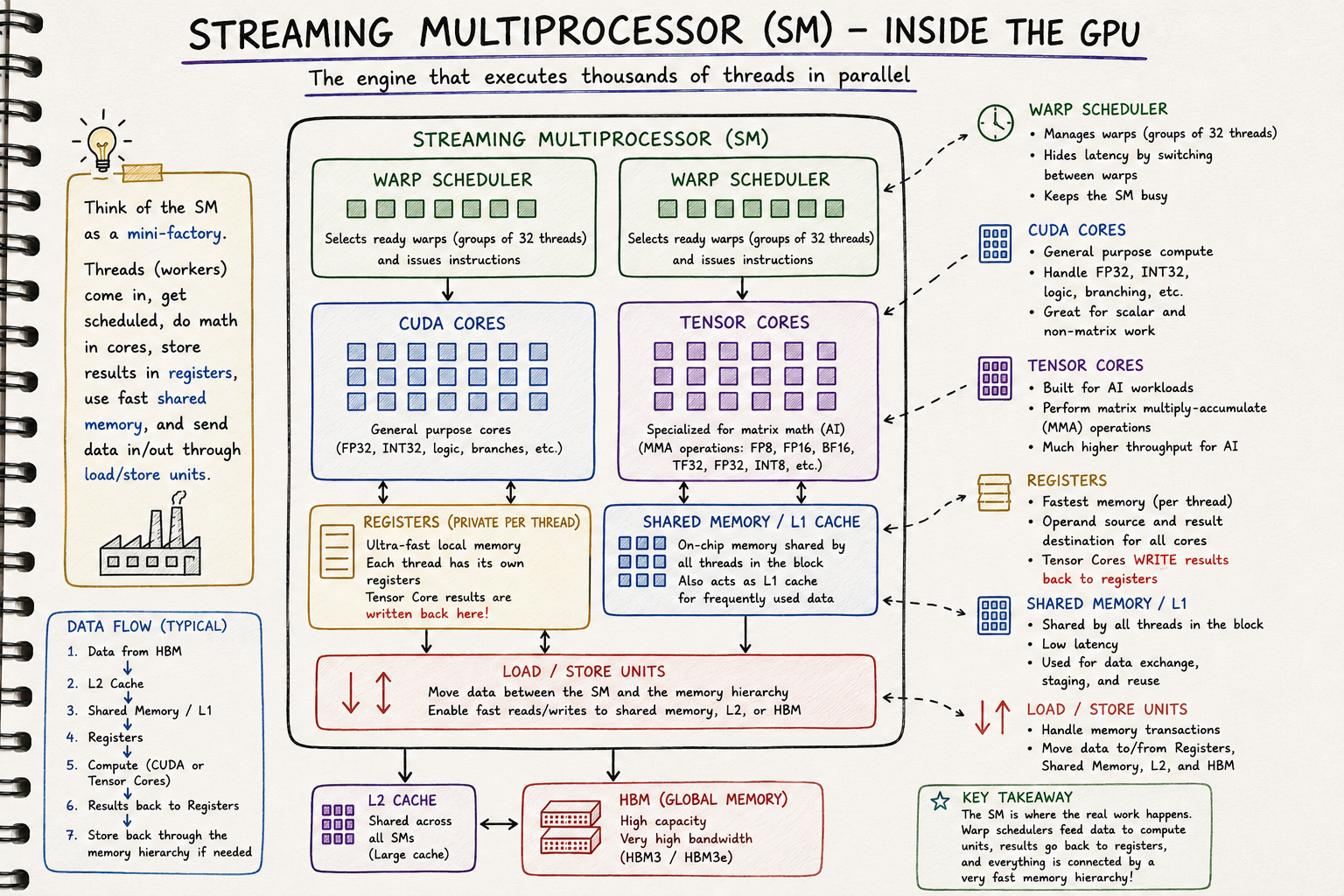
Let's look at the role each one plays.
CUDA Cores
CUDA Cores are the general-purpose compute units inside an SM.
They perform the arithmetic operations that don't require specialised hardware.
Typical operations include:
- Integer arithmetic
- Floating-point arithmetic
- Address calculations
- Comparisons
- Branch instructions
Every CUDA Core executes instructions for one thread at a time.
While they're essential for every CUDA program, they are not the hardware responsible for the large matrix multiplications used in modern AI models.
Those are handled somewhere else.
Tensor Cores
Tensor Cores are one of the biggest reasons modern AI training and inference are so fast.
Instead of performing arithmetic on individual numbers like CUDA Cores, Tensor Cores are specialised for matrix multiplication, which is the operation performed repeatedly inside transformer models.
A Tensor Core performs operations of the form:
D = A × B + CThis is called a Fused Multiply-Add (FMA) operation.
Rather than performing the multiplication first and the addition afterwards, both operations are fused together into a single hardware instruction.
That makes the operation both faster and more energy efficient.
This matters because almost every layer in a neural network eventually becomes a matrix multiplication.
Without Tensor Cores, modern LLM training and inference would be dramatically slower.
Warp Schedulers
If you've read my previous article on GPU Work Units, you'll remember that threads don't execute individually.
They execute in groups of 32 threads, known as warps.
The job of the Warp Scheduler is to decide which warp should execute next.
Each H100 SM contains four Warp Schedulers.
Every clock cycle, each scheduler selects one ready warp and issues its next instruction.
That means up to four warps can begin executing instructions in the same clock cycle.
This doesn't mean an SM can only have four warps.
In fact, an H100 can keep up to 64 resident warps on an SM.
The remaining warps simply wait their turn.
How the GPU Hides Memory Latency
Suppose one warp needs to read data from HBM.
That memory access may take hundreds of clock cycles.
If the GPU simply waited, the compute units would sit idle.
Instead, the Warp Scheduler immediately switches to another warp that's ready to execute.
Warp 1

Waiting for memory

        ↓

Warp Scheduler

        ↓

Run Warp 2 instead
When Warp 1's data finally arrives, it becomes ready again and rejoins the scheduling queue.
This process happens continuously while the GPU is running.
Instead of waiting for memory, the GPU keeps switching between ready warps, allowing the compute units to remain busy.
This technique is known as latency hiding, and it's one of the key reasons GPUs achieve such high throughput.
Registers and Shared Memory
Every SM also contains its own registers and shared memory.
Registers provide each thread with the fastest storage available for temporary values.
Shared Memory allows threads within the same thread block to cooperate by sharing data without repeatedly accessing HBM.
Both are located on-chip, making them significantly faster than global memory.
Rather than repeating those topics here, I've covered them in detail in my previous article on the GPU Memory Hierarchy.
(Insert internal link here.)
Putting It Together
Every Streaming Multiprocessor is effectively a self-contained compute engine.
When a thread block arrives, the SM:
- Stores temporary values in registers.
- Allows threads within the block to share data through shared memory.
- Uses Warp Schedulers to coordinate execution.
- Executes general-purpose instructions on CUDA Cores.
- Executes matrix multiplications on Tensor Cores.
- Reads and writes data through the GPU memory hierarchy.
Every SM performs this process independently.
Multiply that by 132 SMs on an H100, and you can begin to see how modern GPUs are capable of executing millions of threads concurrently.
Putting It All Together: Following a CUDA Kernel
We've talked about the different parts of the GPU.
Now let's see how they all work together.
Suppose you write the following line of code in PyTorch:
torch.matmul(A, B)Although it looks like a single function call, a lot happens behind the scenes before the result is produced.
Let's follow that journey.
Step 1: Launching the Kernel
The first thing PyTorch does is launch a CUDA kernel.
Remember from the previous article that a kernel is simply a function that runs on the GPU.
The kernel contains all the instructions needed to perform the matrix multiplication.
At this point, no computation has happened yet.
The GPU has only received work to execute.
Step 2: Creating the Grid
The kernel is then divided into a grid made up of many thread blocks.
Each thread block contains many threads that will work together to compute part of the final result.
Instead of giving the entire problem to one processor, the GPU breaks it into thousands of smaller pieces that can be processed in parallel.
If you're unfamiliar with grids and thread blocks, you can read my previous article on GPU Work Units.
(https://barilon.com/blog/how-gpus-execute-work-understanding-threads-warps-thread-blocks-and-grids)
Step 3: Scheduling Thread Blocks
Next, the GPU scheduler distributes the thread blocks across the available Streaming Multiprocessors (SMs).
On an H100, there are 132 SMs, so many thread blocks can execute simultaneously.
Each thread block is assigned entirely to one SM.
Once a thread block begins executing on an SM, it remains there until it finishes.
Step 4: Warps Begin Executing
Inside the SM, the thread block is divided into warps.
Each warp contains 32 threads.
The Warp Scheduler chooses which ready warp should execute next.
If one warp has to wait for data from memory, another ready warp is scheduled immediately.
This constant switching helps keep the compute units busy instead of waiting on memory.
Step 5: The Compute Begins
Now the actual work starts.
The SM reads the required data through the GPU memory hierarchy.
Frequently used values are stored in registers.
Threads within the same thread block cooperate through shared memory.
If the computation involves matrix multiplication, the Tensor Cores perform the heavy lifting.
Other instructions, such as address calculations, comparisons and control logic, are handled by the CUDA Cores.
All of this happens simultaneously inside every active SM.
Step 6: Writing the Result
Once the computation is complete, the output is written back to global memory.
When every thread block has finished, the kernel completes and control returns to your application.
From your perspective, all you see is:
torch.matmul(A, B)But underneath that single line of code, thousands of thread blocks, millions of threads and hundreds of Streaming Multiprocessors have worked together to produce the result.
The Complete Picture
The entire execution flow now looks like this:
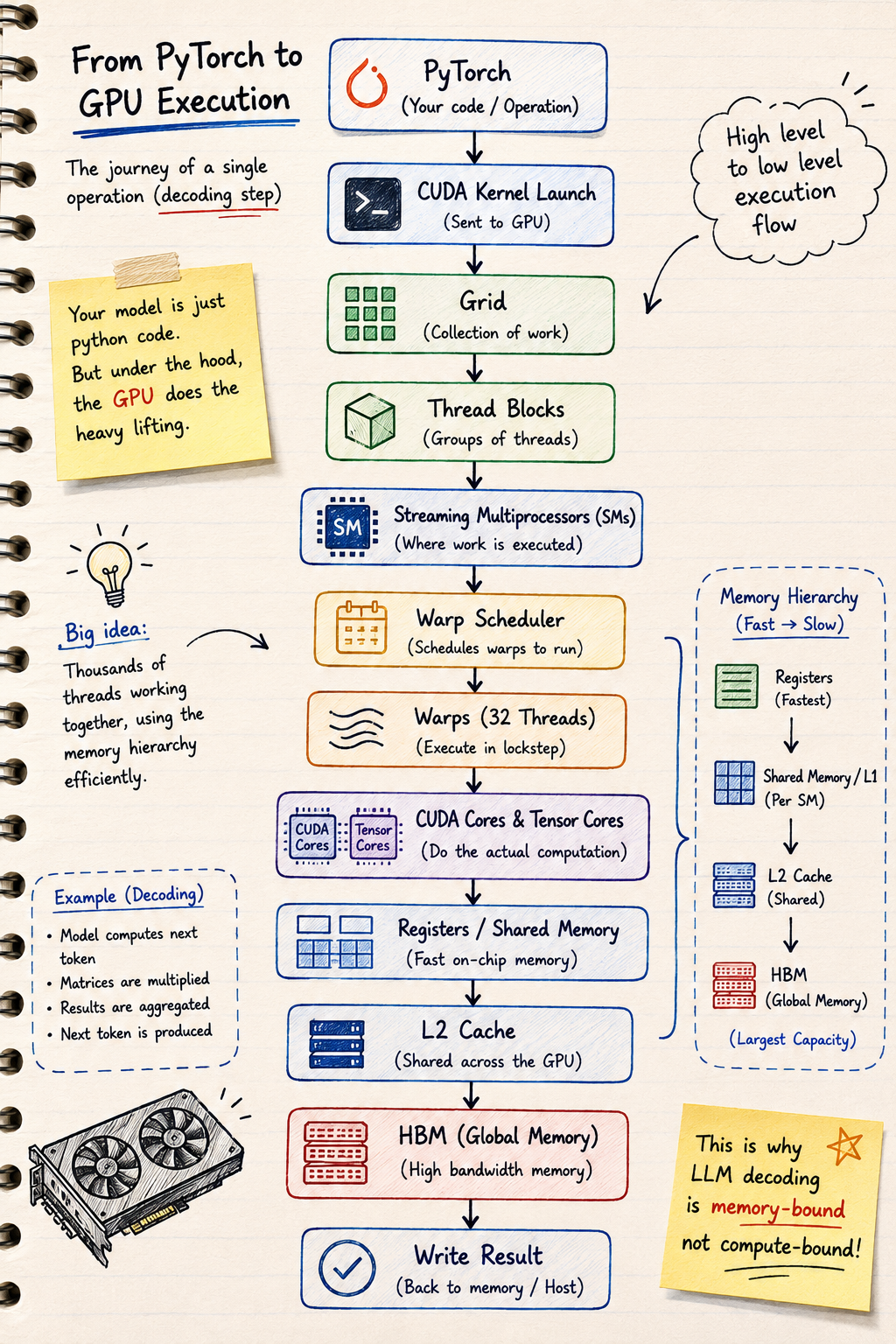
Once you understand this flow, many GPU optimisation techniques become much easier to reason about.
For example:
- Increasing occupancy allows more warps to be available when others are waiting on memory.
- Register spilling pushes data into much slower memory, reducing performance.
- Shared memory reduces expensive trips to HBM.
- Tensor Cores dramatically accelerate matrix multiplication.
- Quantisation reduces the amount of data that needs to be moved from memory.
- FlashAttention improves memory access patterns during attention.
- vLLM improves KV cache management during LLM inference.
Although these optimisations solve different problems, they all make much more sense once you understand how work moves through the GPU.
Why AI Infrastructure Engineers Should Care
You don't need to write CUDA kernels to benefit from understanding GPU architecture.
Whether you're deploying inference workloads, running distributed training jobs, operating Kubernetes GPU clusters or troubleshooting poor GPU utilisation, understanding the hardware helps explain why workloads behave the way they do.
Without that understanding, many optimisation techniques can feel like a collection of best practices to memorise.
Once you understand the architecture, they become logical engineering decisions based on how the hardware actually works.
Key Takeaways
- A GPU is made up of many Streaming Multiprocessors (SMs) that execute work in parallel.
- Thread blocks are scheduled onto SMs, where they are divided into warps.
- Warp Schedulers coordinate execution and help hide memory latency.
- CUDA Cores execute general-purpose instructions, while Tensor Cores accelerate matrix multiplication.
- Registers and Shared Memory keep frequently used data close to the compute units.
- The GPU memory hierarchy feeds data to the SMs, allowing the compute units to stay busy.
- Understanding the architecture makes many GPU optimisation techniques much easier to understand.
Related Articles
If you're following this GPU fundamentals series, these articles build on one another:
- Understanding GPU Work Units: Threads, Warps, Thread Blocks and Grids
- Understanding the GPU Memory Hierarchy
- Why LLM Decoding Is Memory-Bound
- Tensor Cores Explained (Coming Soon)
Final Thoughts
GPU architecture can seem intimidating at first because there are so many moving parts.
The good news is that every component exists for a reason.
Streaming Multiprocessors organise the work.
Warp Schedulers keep the compute units busy.
Registers and shared memory keep data close to the cores.
Tensor Cores accelerate the matrix multiplications that dominate modern AI.
And the memory hierarchy feeds everything with data.
Once you understand how these pieces fit together, you stop seeing GPU optimisation as a collection of tricks and start seeing it as an engineering problem: how do we keep the compute units busy while moving data as efficiently as possible?
That's the question behind almost every high-performance AI system.