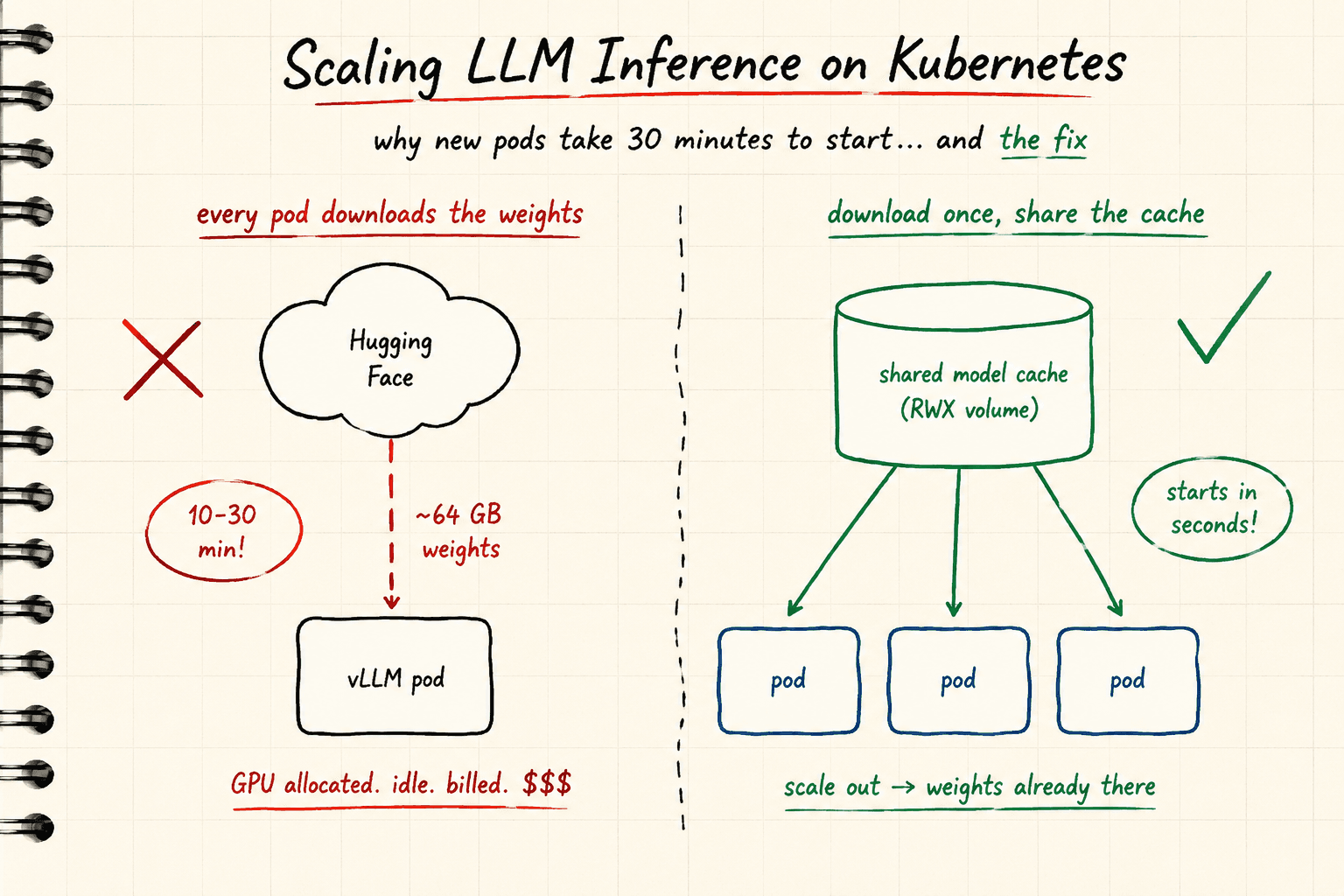
Scaling AI models on Kubernetes is not like scaling a normal web service. The reason is simple: large models depend on things Kubernetes was never designed around — tens of gigabytes of model weights, GPU drivers, and specialized runtimes. If you don't orchestrate scaling carefully, you end up paying for some of the most expensive hardware in the world while it sits idle, doing nothing.
In this post we'll walk through what actually happens when a GPU inference pod scales up, where all the time goes, and the one fix that gives you the biggest improvement: a shared model cache.
First, some quick VRAM math
Let's say we're serving Qwen3-32B in FP16 precision. A rough rule of thumb: FP16 uses 2 bytes per parameter, so:
32B parameters × 2 bytes = ~64 GB just for the weights
Now imagine serving that on an H100, which has 80 GB of VRAM:
80 GB − 64 GB = 16 GB left over
That leftover 16 GB has to hold everything else: the KV cache (which is what actually serves your concurrent users), activations, and CUDA overhead. With only 16 GB of KV cache headroom, you can't serve many concurrent requests before vLLM starts hitting its limits.
In practice you'd solve this with tensor parallelism (splitting the model across 2 GPUs) or quantization (shrinking the weights to FP8 or INT4). We won't go deep on those here the point of this post is the scaling story. Just keep that 64 GB number in your head, because it's about to become the villain.
Anatomy of a cold start: where the time actually goes
Here's the life of a new inference pod, step by step. Say traffic spikes and your autoscaler decides you need another replica:
1. Pod goes Pending. If there's no free GPU capacity, your Cluster Autoscaler or Karpenter has to provision a whole new node first. That's a fresh machine boot.
2. The node has to become GPU-ready. A GPU node isn't usable the moment it boots. The NVIDIA driver, container toolkit, and device plugin all need to be running before the kubelet even advertises nvidia.com/gpu as a schedulable resource. (The GPU Operator automates this, but it still takes time.)
3. Image pull. vLLM images are multiple GB. Pulling that over the network adds more minutes.
4. The big one: downloading the weights. Once the container starts, vLLM has to fetch ~64 GB of model weights from Hugging Face (or wherever you host them). Depending on your network, that's 10–30 minutes of your GPU sitting there, allocated, billed, and doing absolutely nothing.
Add it all up and your "autoscaling" event can take over half an hour from trigger to serving traffic.
Why this actually matters
Two angles:
Cost. Every minute of that cold start, you're paying full price for an idle GPU. One pod, once, is a rounding error. But multiply it across every scale-up event, every deployment rollout, every crashed pod that restarts, every node replacement and it quietly becomes a significant line on your cloud bill.
Users. Autoscaling exists to handle bursty load. But if a new replica takes 30 minutes to become ready, it's useless for a traffic spike happening right now. Your existing replicas get saturated, latency climbs, and by the time the new pod is ready, the burst may already be over. Slow cold starts effectively break autoscaling.
Steps 1–3 are hard to eliminate entirely (short of pre-warming spare capacity, which means paying for idle nodes on purpose). But step 4 — the weight download — is completely fixable. That's where we focus.
The fix: stop downloading weights on every pod start
The idea is simple: download the weights once, store them on a volume that every pod can mount, and let new pods skip the download entirely. But the details matter, so let's look at the naive approaches first and why they fall apart.
❌ Attempt 1: emptyDir
An emptyDir volume lives and dies with the pod. Every restart, every new replica, downloads the full 64 GB again from scratch. You've cached nothing — you've just given the download somewhere to live. All the idle time and wasted spend stays exactly where it was.
❌ Attempt 2: a regular PVC (EBS and friends)
A PVC backed by block storage like EBS is ReadWriteOnce it can only be mounted by pods on one node at a time. For a single-replica deployment it works fine. But that's not production. The moment you scale to 2 replicas on different nodes, the second pod can't bind the volume and gets stuck in Pending forever. Your autoscaling is now worse than before — it can't scale at all.
❌ Attempt 3: StatefulSet with per-pod volumes
A StatefulSet gives every replica its own PVC, so pods do start. But now you're storing the same 64 GB of weights N times — pure storage waste and every new replica still pays the full download penalty the first time it comes up. You've fixed restarts but not scale-ups, which was the whole point.
✅ The right approach: a shared ReadWriteMany file system
What we actually want is a shared file system with ReadWriteMany (RWX) access something like EFS on AWS, Filestore on GCP, or CephFS/NFS on bare metal. RWX means any number of pods on any number of nodes can mount the same volume simultaneously.
Now the weights live in one place. Every pod new replica, crashed-and-restarted pod, rolling update mounts the cache and finds the weights already sitting there. The 10–30 minute download becomes a few seconds of reading from the file system.
Here's the PVC:
apiVersion: v1
kind: PersistentVolumeClaim
metadata:
  name: hf-model-cache
spec:
  accessModes:
    - ReadWriteMany
  resources:
    requests:
      storage: 1Ti
  storageClassName: efs-sc   # or your RWX-capable storage class
Populating the cache: a one-time download Job
To fill the cache, run a Kubernetes Job that downloads the weights into the shared volume completely decoupled from your inference deployment. If you update models regularly, make it a CronJob that refreshes the cache on a schedule. Either way, your vLLM pods never touch Hugging Face at startup again.
apiVersion: batch/v1
kind: Job
metadata:
  name: model-download
spec:
  backoffLimit: 3
  template:
    spec:
      restartPolicy: Never
      containers:
        - name: model-download
          image: python:3.10-slim
          command: ["sh", "-c"]
          envFrom:
            - secretRef:
                name: hf-token-secret
          env:
            - name: MODEL_NAME
              value: "Qwen/Qwen3-32B"
            - name: MODEL_REVISION
              value: "9216db5781bf21249d130ec9da846c4624c16137"  # pin a revision for reproducibility
            - name: HF_HOME
              value: /cache/huggingface
            - name: HF_XET_HIGH_PERFORMANCE
              value: "1"
          args:
            - |
              set -eux
              pip install --no-cache-dir "huggingface_hub[cli]"
              hf download $MODEL_NAME --revision $MODEL_REVISION
          resources:
            requests:
              cpu: "2"
              memory: "8Gi"
            limits:
              cpu: "8"
              memory: "16Gi"
          volumeMounts:
            - name: model-cache
              mountPath: /cache/huggingface
      volumes:
        - name: model-cache
          persistentVolumeClaim:
            claimName: hf-model-cache
Two details worth calling out:
- Pin the model revision. Model repos on Hugging Face get updated. Pinning a commit hash means every environment serves exactly the same weights — no surprises.
- The download Job doesn't need much memory. The weights stream to disk, not into RAM. A few Gi is plenty.
The vLLM Deployment
Now the serving layer. The pods mount the same PVC at vLLM's default Hugging Face cache location (/root/.cache/huggingface), so vLLM finds the weights instantly and goes straight to loading them onto the GPUs.
Since Qwen3-32B doesn't leave enough KV cache headroom on a single H100, this example uses tensor parallelism across 2 GPUs:
apiVersion: apps/v1
kind: Deployment
metadata:
  name: vllm-qwen3
spec:
  replicas: 2
  selector:
    matchLabels:
      app: vllm-qwen3
  template:
    metadata:
      labels:
        app: vllm-qwen3
      annotations:
        prometheus.io/scrape: "true"
        prometheus.io/path: /metrics
        prometheus.io/port: "8000"
    spec:
      containers:
        - name: vllm
          image: vllm/vllm-openai:v0.6.3   # pin a version, never :latest
          args:
            - --model
            - Qwen/Qwen3-32B
            - --tensor-parallel-size
            - "2"               # split the model across 2 GPUs
            - --dtype
            - bfloat16
            - --max-model-len
            - "4096"            # cap context to leave VRAM for concurrent requests
            - --gpu-memory-utilization
            - "0.90"            # leave headroom for CUDA overhead
            - --served-model-name
            - qwen3             # friendly name for the API
          ports:
            - containerPort: 8000
          resources:
            requests:
              nvidia.com/gpu: "2"
              cpu: "8"
              memory: "64Gi"
            limits:
              nvidia.com/gpu: "2"
              memory: "80Gi"
          env:
            - name: HUGGING_FACE_HUB_TOKEN
              valueFrom:
                secretKeyRef:
                  name: hf-token-secret
                  key: token
          volumeMounts:
            - name: model-cache
              mountPath: /root/.cache/huggingface
            - name: dshm
              mountPath: /dev/shm    # vLLM needs shared memory for tensor parallelism
          readinessProbe:
            httpGet:
              path: /health
              port: 8000
            initialDelaySeconds: 60
            periodSeconds: 10
            failureThreshold: 30
          livenessProbe:
            httpGet:
              path: /health
              port: 8000
            initialDelaySeconds: 120   # give the model time to load before liveness kicks in
            periodSeconds: 30
            failureThreshold: 3
            timeoutSeconds: 10
      volumes:
        - name: model-cache
          persistentVolumeClaim:
            claimName: hf-model-cache
        - name: dshm
          emptyDir:
            medium: Memory
            sizeLimit: 8Gi
      nodeSelector:
        karpenter.sh/nodepool: gpu-inference   # land on GPU nodes
      tolerations:
        - key: nvidia.com/gpu
          operator: Exists
          effect: NoSchedule
A few things to notice:
- The cache mount path. The download Job used
HF_HOME=/cache/huggingface; vLLM uses its default of/root/.cache/huggingface. Different mount paths, same volume — what matters is that both see the samehub/directory inside it. /dev/shmas a memory-backed emptyDir. With tensor parallelism, vLLM's worker processes communicate through shared memory. The default container/dev/shm(64 MB) is far too small, so we mount a memory-backed volume.- Generous probe budgets. Even with cached weights, loading 64 GB onto GPUs takes a couple of minutes. The liveness probe waits before it starts checking, so Kubernetes doesn't kill a pod that's simply still loading.
The payoff
With the shared cache in place, scaling out a new replica goes from "wait 10–30 minutes for a download" to "load from the file system and start serving." Crashed pods recover in minutes instead of half an hour. Rolling updates stop being an expensive, GPU-idling event. And your autoscaling actually does what it's supposed to do: respond to load while the load is still there.
The remaining cold-start cost — node provisioning, GPU readiness, image pull — is a separate battle (pre-pulled images, warm node pools, and image streaming all help). But eliminating the weight download is the single biggest win, and it costs you nothing more than one RWX volume and a download Job.
If you're running LLM inference on Kubernetes and haven't done this yet, it's probably the highest-ROI afternoon of work available to you.
Related Articles
If you're following this GPU fundamentals series, these articles build on one another:
- Understanding GPU Work Units: Threads, Warps, Thread Blocks and Grids
- Understanding the GPU Memory Hierarchy
- Why LLM Decoding Is Memory-Bound
- Tensor Cores Explained (Coming Soon)