Understanding How Kubernetes Supports GPUs
Kubernetes has become the standard platform for running modern applications. It works exceptionally well for web applications, APIs, databases and many other workloads.
However, AI workloads are different.
Unlike a traditional web application, training a model or serving an LLM requires access to specialised hardware such as GPUs.
This raises an important question:
If Kubernetes was originally designed around CPUs and memory, how does it run GPU workloads today?
Let's break it down.
What Resources Does Kubernetes Understand?
Out of the box, Kubernetes only understands three main compute resources on a node:
- CPU
- Memory (RAM)
- Ephemeral Storage
These resources are enough for most traditional applications.
- CPU executes instructions.
- Memory stores data while the application is running.
- Storage stores files that the application needs.
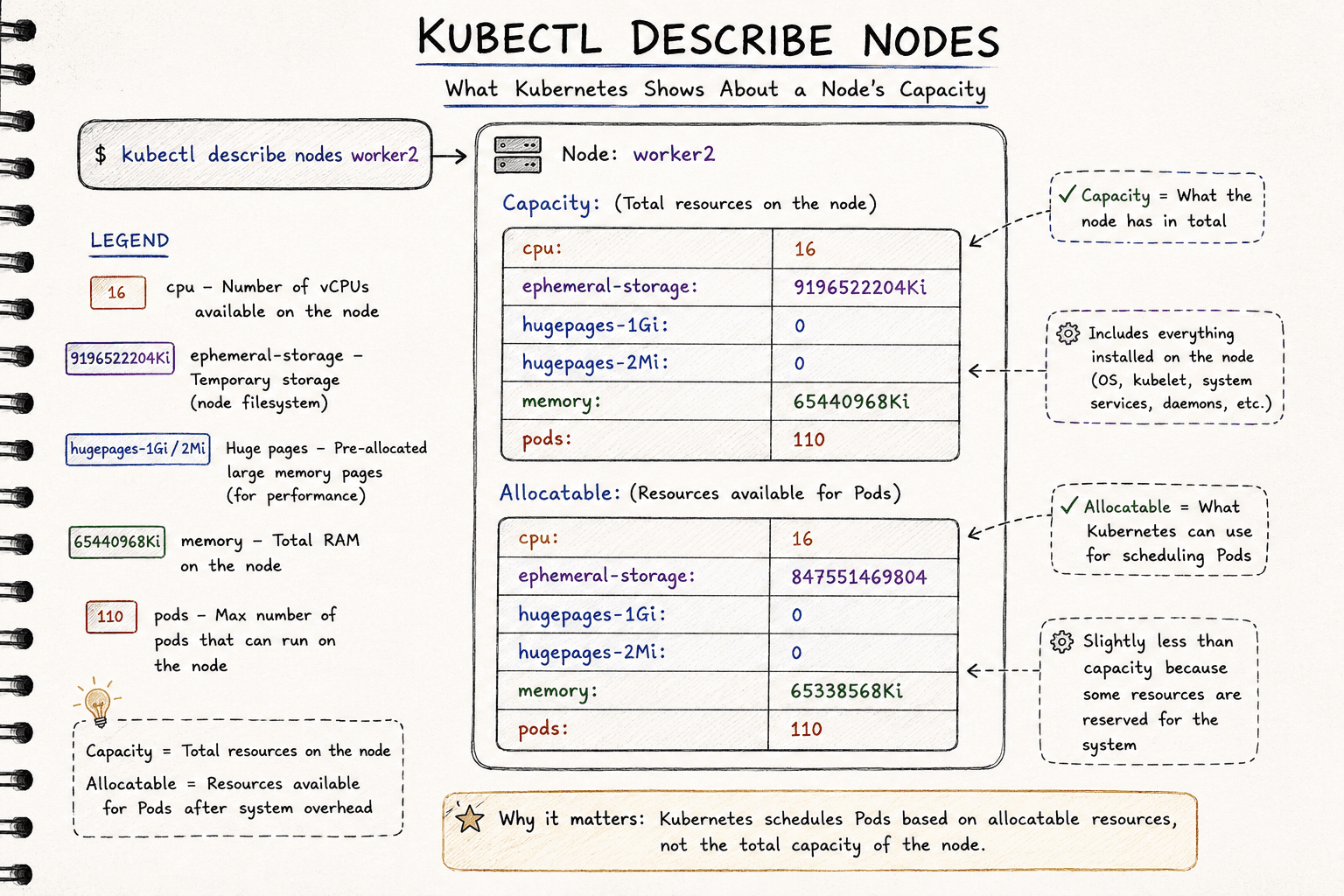
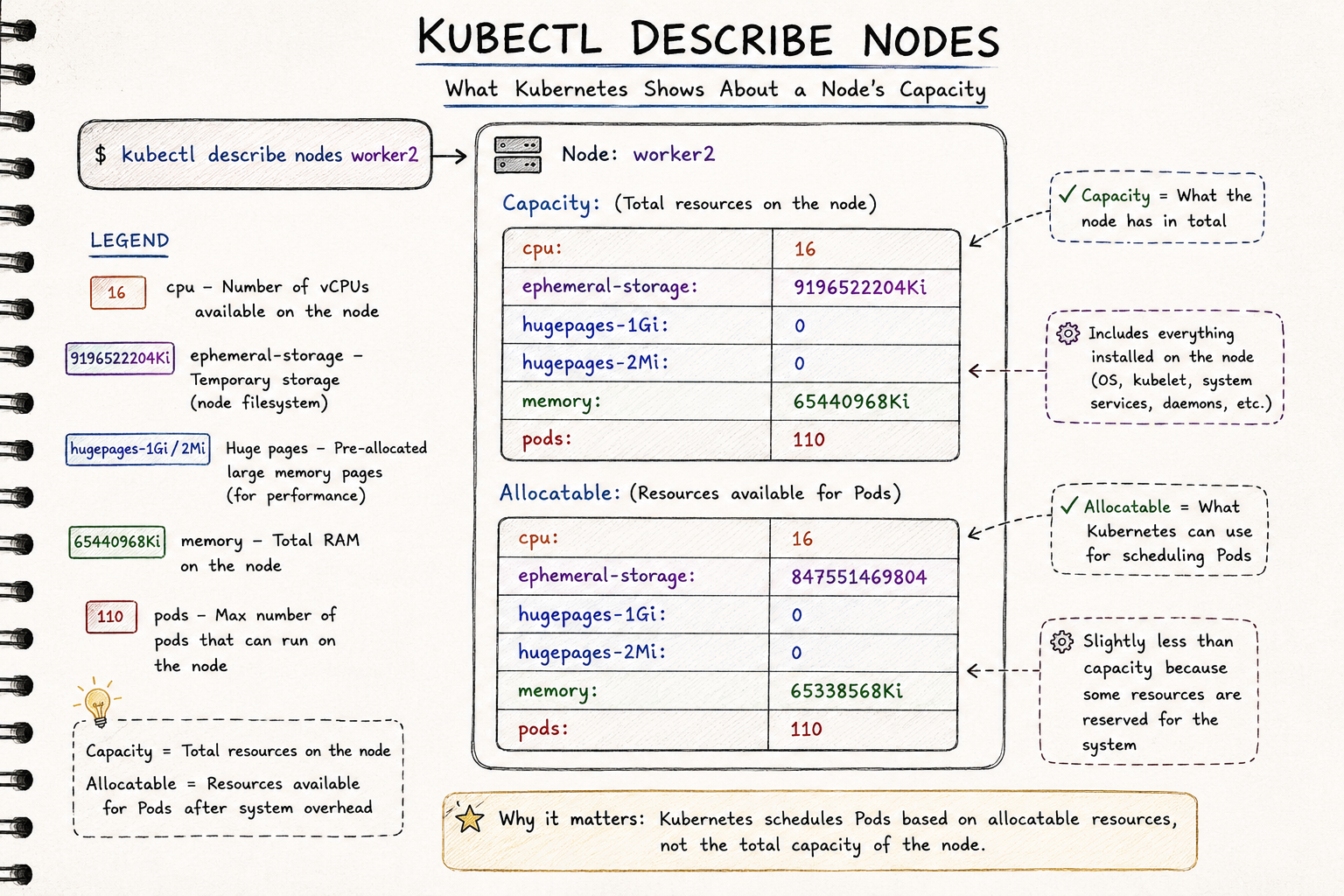
You can see these resources by describing a node.
kubectl describe node <node-name>The output will show the node's available CPU, memory and storage because these are the resources Kubernetes understands natively.
Why AI Workloads Are Different
AI workloads still need all of the resources above, but they also depend on another critical piece of hardware:
The GPU.
Each resource has a different role.
- CPU prepares data, performs tokenisation and coordinates work.
- Memory (RAM) temporarily stores data before it is transferred to the GPU.
- Storage holds datasets, model checkpoints and other files.
- GPU performs the massive matrix multiplications required for training and inference.
Without GPUs, training modern foundation models or serving LLMs at scale would be impractical.
The GPU Problem
Here's the challenge.
Kubernetes doesn't know what a GPU is.
When Kubernetes was first created, GPUs weren't a common requirement for containerised workloads. As a result, the scheduler has no built-in understanding of GPU resources.
This creates two fundamental problems.
Problem 1: Scheduling
The Kubernetes scheduler can only schedule workloads based on resources it knows about.
It understands CPU.
It understands memory.
It understands storage.
But it doesn't understand GPUs.
If Kubernetes doesn't know a node has GPUs, it cannot place GPU workloads on that node.
Problem 2: Container Isolation
Let's assume a pod is scheduled onto a node that has GPUs installed.
That still doesn't mean the application can use them.
Containers are isolated from the host operating system.
By default, they cannot see GPU device files such as:
/dev/nvidia0
/dev/nvidia1
/dev/nvidia2
They also don't have access to the NVIDIA libraries required to communicate with the GPU.
So although the GPU exists physically on the server, the container has no way of using it.
How Kubernetes Solves This
To solve this problem, Kubernetes introduced the Device Plugin Framework.
A Device Plugin allows hardware vendors to advertise specialised hardware to Kubernetes.
This isn't limited to GPUs.
The same framework can also be used for:
- GPUs
- FPGAs
- SmartNICs
- AI accelerators
- Other custom hardware
For NVIDIA GPUs, NVIDIA provides the NVIDIA Device Plugin.
Its job is simple.
It runs on every GPU node and:
- Discovers the GPUs installed on the node.
- Reports those GPUs to the kubelet.
- The kubelet advertises those resources to the Kubernetes API.
- The scheduler can now schedule GPU workloads correctly.
The Device Plugin doesn't schedule workloads itself.
It simply tells Kubernetes:
"This node has GPUs available."
How GPU Discovery Works
The discovery process looks like this.
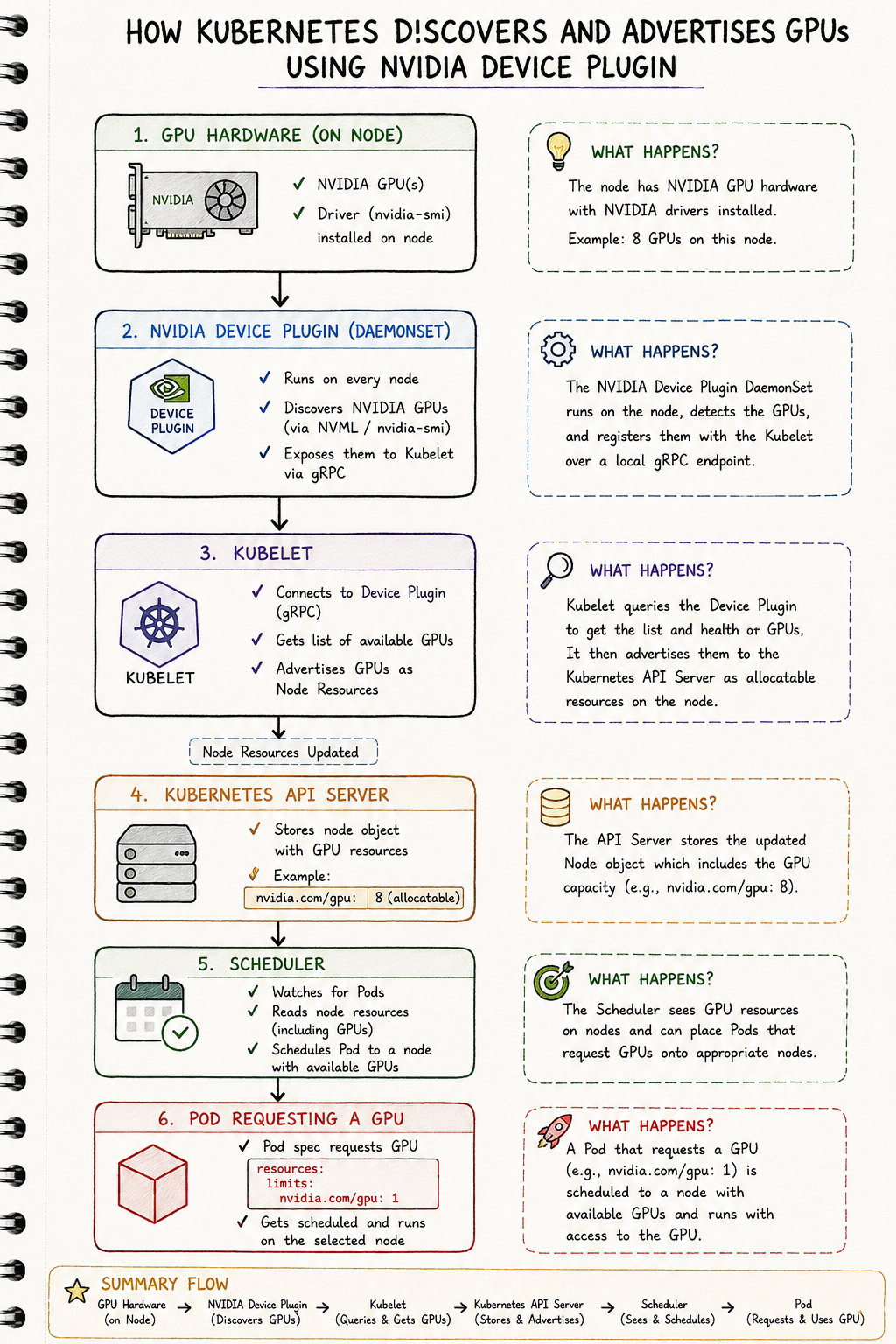
Once the Device Plugin registers the GPUs, you'll see something similar when describing a node:
Capacity:

cpu: 32

memory: 256Gi

nvidia.com/gpu: 8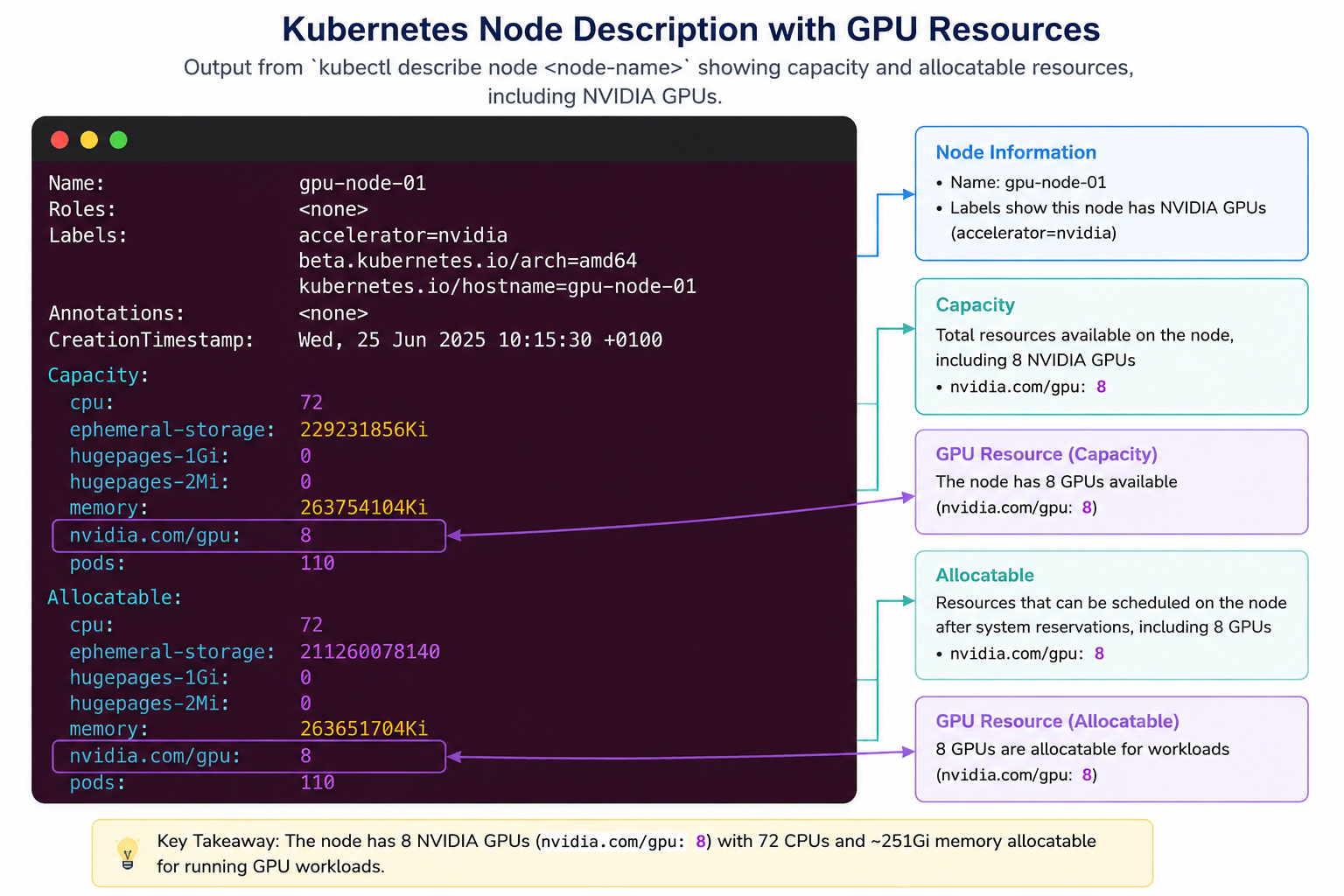
This tells Kubernetes that the node has eight GPUs available for scheduling.
A pod can now request a GPU like this:
resources:
  limits:
    nvidia.com/gpu: 1
When the scheduler sees this request, it only considers nodes that have available GPU resources.
But the Device Plugin Isn't Enough
At this point, Kubernetes knows which nodes have GPUs.
However, that's only half the problem.
The application inside the container still needs access to the GPU.
Making GPUs available inside containers requires several additional components.
Think of GPU support as a four-layer stack.
Application
      │
      ▼
NVIDIA Device Plugin
      │
      ▼
NVIDIA Container Toolkit
      │
      ▼
NVIDIA Driver
      │
      ▼
GPU Hardware
Each layer has a different responsibility.
GPU Hardware
This is the physical GPU installed in the server.
Examples include the NVIDIA H100, A100 and L40S.
NVIDIA Driver
The driver allows Linux to communicate with the GPU hardware.
Without the driver, the operating system cannot detect or use the GPU.
NVIDIA Container Toolkit
The NVIDIA Container Toolkit bridges the gap between the host and the container.
It exposes:
- GPU device files
- CUDA libraries
- NVIDIA runtime
inside the container.
Without it, the application cannot access the GPU, even if the host can.
NVIDIA Device Plugin
The Device Plugin advertises GPU resources to Kubernetes.
Without it, Kubernetes doesn't know GPUs exist and cannot schedule GPU workloads.
Why Do We Need All Four Layers?
Each layer solves a different problem.
| Layer | Responsibility |
|---|---|
| GPU Hardware | Performs the computation |
| NVIDIA Driver | Allows Linux to communicate with the GPU |
| NVIDIA Container Toolkit | Makes the GPU visible inside containers |
| NVIDIA Device Plugin | Makes Kubernetes aware of GPU resources |
Remove any one of these layers and GPU workloads stop working.
Managing All These Components
Installing and maintaining every component manually quickly becomes difficult.
You need to manage:
- GPU drivers
- Driver upgrades
- NVIDIA Container Toolkit
- Device Plugin
- Version compatibility
Doing this across hundreds of Kubernetes nodes becomes a significant operational burden.
To simplify this, NVIDIA created the GPU Operator.
The GPU Operator automates the deployment and lifecycle management of the entire GPU software stack.
Instead of installing each component individually, you install the GPU Operator, and it manages everything required to run GPU workloads on Kubernetes.
Why AI Infrastructure Engineers Should Care
If you're deploying AI workloads on Kubernetes, understanding this architecture helps explain why GPU workloads sometimes fail.
For example:
- Why isn't Kubernetes seeing my GPU?
- Why does my pod stay in the Pending state?
- Why does
nvidia.com/gpunot appear on the node? - Why can
nvidia-smirun on the host but not inside my container?
Without understanding the GPU software stack, these problems can be difficult to troubleshoot.
Once you understand the role of the Device Plugin, the NVIDIA Container Toolkit and the GPU drivers, debugging becomes much more straightforward.
Key Takeaways
- Kubernetes natively understands CPU, memory and ephemeral storage—but not GPUs.
- AI workloads require GPUs in addition to the standard Kubernetes resources.
- The NVIDIA Device Plugin discovers GPUs and advertises them to Kubernetes.
- The kubelet reports GPU resources to the Kubernetes API, allowing the scheduler to place GPU workloads correctly.
- The NVIDIA Container Toolkit exposes GPUs inside containers.
- NVIDIA drivers allow Linux to communicate with the GPU hardware.
- The NVIDIA GPU Operator automates deployment and management of the entire GPU software stack.
Final Thoughts
Running GPU workloads on Kubernetes is about much more than plugging a GPU into a server.
Before a pod can use a GPU, Kubernetes must first discover the hardware, advertise it as a schedulable resource, expose it inside containers and ensure the operating system can communicate with it.
Each component in the GPU software stack plays a specific role.
Understanding how they work together gives you a much clearer picture of how AI workloads are scheduled and executed on Kubernetes.
In the next article, we'll take a deeper look at the NVIDIA GPU Operator and explore the components it manages behind the scenes to make GPU-enabled Kubernetes clusters easier to build and operate.
Related Articles
If you're following this GPU fundamentals series, these articles build on one another:
- Understanding GPU Work Units: Threads, Warps, Thread Blocks and Grids
- Understanding the GPU Memory Hierarchy
- Why LLM Decoding Is Memory-Bound
- Tensor Cores Explained (Coming Soon)